ConnectX-4 goodness
or, a wee bit closer to light speed
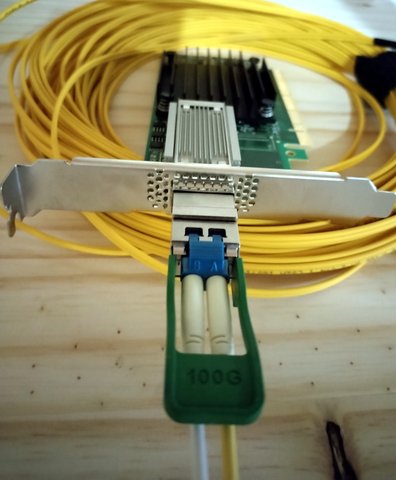
Setting the stage
As a follow up of sorts from the rack post, I've been getting all the needed tools and equipment for a company project, and because we are cheapskates at heart most everything is being bought from the used market. This means no recent stuff, mostly, but also it means we can get top end equipment from yesteryear for cheaper than current home market. And so we go server grade, and we get great bargains if we buy what we need along with what we might need someday.
And sometimes, only sometimes, we get to skip a few technology steps to get something that would be completely out of consideration for not only being overkill but completely over budget, except now it is really a no brainer.
We'll be using a couple of Dell PowerEdge R720XD servers running Proxmox Virtual Environment 8 for the following tests, but first what is it that we're doing?
The idea, in a very rant like nutshell
Specifically, when deciding on the network connections for the servers, we needed something better than the ubiquitous 1 gig ethernet, along with multiple interfaces per server, for out of band file copies, isolation and redundancy. At the very least we were looking for better than 1 gig with these goals in mind.
Having mostly Cat6 across the house and office, 10gbase-T seems like the proper go-to, and patch cables are something we know and love, so we start searching for interfaces and switches and prices are not... appealing. I mean, it's likely cheaper than 1000base-t stuff was a decade ago, but still, dropping the copper requirement allows for so much better prices.
I have never done fibre personally. Of course many of the servers I managed at one stage of my professional life or another had fibre based networking, but it was all transparent to me, it just meant 'bits go faster and/or further', mostly. But I am a curious person and immediately found myself in a huge rabbit hole looking at fusion splicing machines and learning a lot more about fibre termination than any sane person should.
Yeah, well, hmmm, where was I?
Taking a step back
I found myself instead dwelling on the merits of the multiple generations of multimode fibre, and all the modulations used to obtain crazy speeds over beams of light, like 400GBase-SR4.2, and looking at eye diagrams for all this was really fun to do, but didn't really add much to my knowledge as I lack the basics to make sense of all of it.
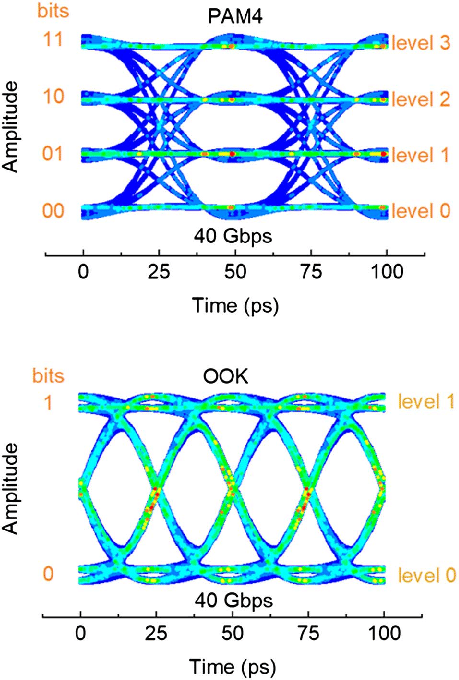
Simulated PAM4 and on-off keying (OOK) eye diagrams at 40 Gbps with a constant modulation bandwidth of 20 GHz. (fun, right?)
Ooof, taking another step back the question of 10G over some fiber type and modulation became one of; why not 25G? or 40G? or 100G?
I could keep going up in speed for a while, the technology is there, but price isn't. Apparently 100G is not enough anymore for the big players and the market is inundated with used material for this, but what I could find faster than that was all crazy expensive.
Fibre networking has this "multiplexing" state of mind to it, 10G might actually be 4x 2.5G lanes electrically, or 2x 5G lanes, and so once a single lane is easily capable of achieving 2.5Gbps we can just send 4 of them to accomplish 10Gbps, but also we may be able to have 10Gbps lanes, so lets send 4 of those and get 40Gbps. You get the idea. 100G is really 4x 25G, and you might be able to send 4 discreet 25Gbps channels over one QSFP28 interface, or an aggregated 100Gbps channel. And you might, depending on hardware support, be able to grab a 100Gbps connection on a switch and break it out to 4 independent 25Gbps connections.
And this can be, at least as advertised as I have not tested this yet, able to negotiate lower speeds, so 100Gbps hardware might be able to talk 40Gbps, or 4x 10Gpbs which will become important in the near future for us.
You see how quickly a simple endeavour becomes a life halting obsession? Not altering, mind you! my life has always been like this.
And this is not even the whole thing
we didn't even touch on the optics side and choice of fibre and connectors. But for this one, and armed with all these "known unknowns" I ended up finding a sweet, sweet deal on a small lot of Mellanox ConnectX-4 100G adapters. I should say NVIDIA Mellanox, but these certainly predate the Mellanox acquisition as they don't mention NVIDIA anywhere on the PCB silkscreen.
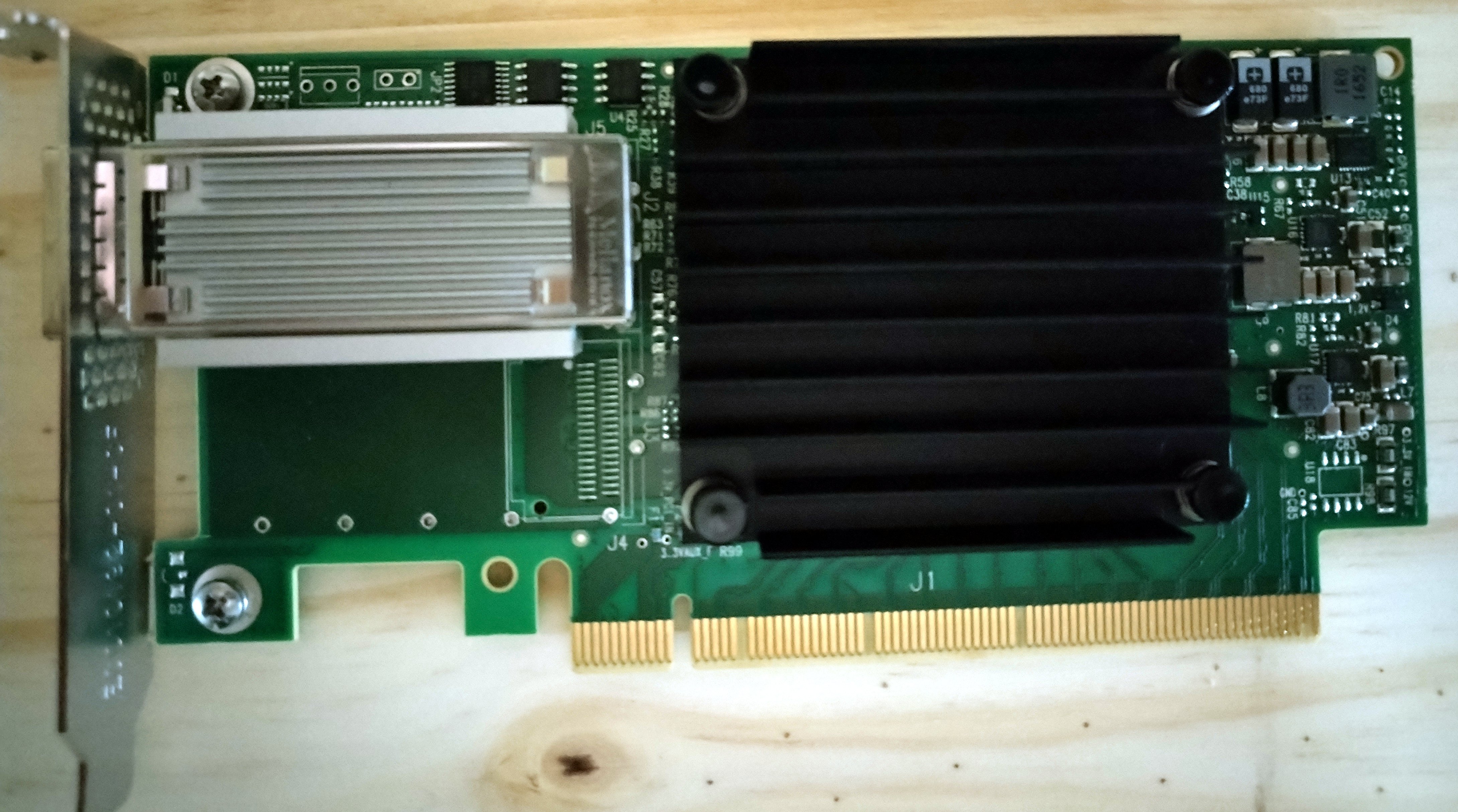
The Mellanox ConnectX-4 CX455A-ECAT
Single QSFP28 port, PCIe 3.0 x16 adapters. Doing some math, having Gen3 PCIe on the servers, I'd be looking at around 8Gbps per lane, full duplex. That would give a theoretical maximum of 128Gbps over the 16 lanes, just enough for one port, perfect match for our needs.
There was a small caveat, though, as these came with the small form factor brackets only, and the servers used, the mentioned Dell R720xd's, these only have PCIe 3.0 x8 slots on the SFF bracket riser. The cards will still work, just at around half the speed having half the lanes available. An order for standard height brackets for these has been placed.
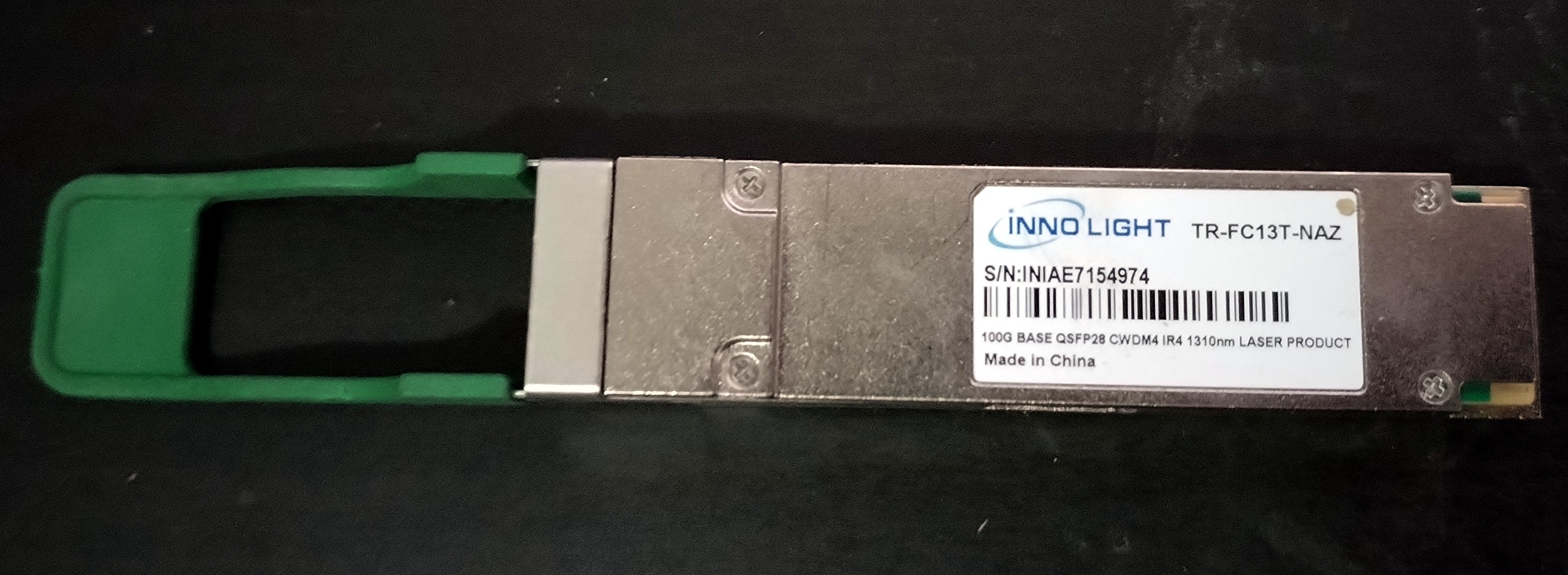
Innolight 100G base CWDM4
For the optics I was looking out for deals in DAC or AOC cables, but even passive DAC cables are fairly expensive. There are a bunch of 100G optic transceivers at ridiculously low prices around, many of which are long range, which will not work for me without attenuators that, curiously, are for the most part more expensive than the transceivers, and some use 8 fibres, often multimode, with an MPT connector. This could be fine, but I really wanted to stick with duplex LC connectors which I can, in theory at least, terminate without special tools using field connectors.
Anyway, long story short(ish), I grabbed a handful of Innolight branded transceivers for about €11 a pop shipped, a few 20m single mode fibre patch cables, duplex LC/LC of course, and crossed my fingers these would all work well together. I'm skipping a lot of information here, such as the fact that to work over a single pair of fibres at this speed there's a specific modulation, and I have no idea if these will require attenuators or not, they don't state a range but CWDM4 (that's the modulation) is supposed to be rated for "up to 2km over duplex single mode fibre". I'm sure it'll be fine...
Each adapter will be paired with an optic module, and so I installed one such kit in each of my 2 test servers. Booting one of the server's up and checking the network interfaces does not show any new one:
root@pacu:~$ ip -br a
lo UNKNOWN 127.0.0.1/8 ::1/128
eno1 UP
eno2 DOWN
eno3 DOWN
eno4 DOWN
vmbr0 UP
But that can be easily explained:
root@pacu:~$ lspci | grep Mellanox
43:00.0 Infiniband controller: Mellanox Technologies MT27700 Family [ConnectX-4]
The ConnectX-4 adapters all came in InfiniBand mode, which would be a whole topic but at this point I'm really only interested in Ethernet, something also supported by these network cards. To change the mode we'll need some Mellanox / NVIDIA software tools.
Downloaded the required Firmware Tools from https://network.nvidia.com/products/adapter-software/firmware-tools/ which have a curious naming scheme, it is still called MFT for the Mellanox Firmare Tools, but since NVIDIA bought Mellanox, they apparently decided the acronym worked just fine, no one would notice that one letter shift, and thus the tools are aptly named:
NVIDIA Firmware Tools (MFT)
Since proxmox is debian based, we grab the latest deb package, at this time mft-4.25.0-62-x86_64-deb.tgz which includes binaries for a bunch of tools and a source package for the Mellanox kernel module.
root@pacu:~/src$ wget https://www.mellanox.com/downloads/MFT/mft-4.25.0-62-x86_64-deb.tgz
--8<--
HTTP request sent, awaiting response... 200 OK
Length: 32738596 (31M) [application/gzip]
Saving to: ‘mft-4.25.0-62-x86_64-deb.tgz’

root@pacu:~/src$ tar xvf mft-4.25.0-62-x86_64-deb.tgz
mft-4.25.0-62-x86_64-deb/
mft-4.25.0-62-x86_64-deb/DEBS/
mft-4.25.0-62-x86_64-deb/DEBS/mft_4.25.0-62_amd64.deb
mft-4.25.0-62-x86_64-deb/DEBS/mft-oem_4.25.0-62_amd64.deb
mft-4.25.0-62-x86_64-deb/DEBS/mft-pcap_4.25.0-62_amd64.deb
mft-4.25.0-62-x86_64-deb/SDEBS/
mft-4.25.0-62-x86_64-deb/SDEBS/kernel-mft-dkms_4.25.0-62_all.deb
mft-4.25.0-62-x86_64-deb/LICENSE.txt
mft-4.25.0-62-x86_64-deb/install.sh
mft-4.25.0-62-x86_64-deb/old-mft-uninstall.sh
mft-4.25.0-62-x86_64-deb/uninstall.sh
root@pacu:~/src$
root@pacu:~/src$ cd mft-4.25.0-62-x86_64-deb/
root@pacu:~/src/mft-4.25.0-62-x86_64-deb$ ls
DEBS  install.sh  LICENSE.txt  old-mft-uninstall.sh  SDEBS  uninstall.sh
If all we want to do is get the adapter to talk ethernet we don't really need the kernel module, just installing the mft_4.25.0-62_amd64.deb package will give us the needed mlxconfig tool, but to run mst, described as a register access driver, we do need that module. Why we would want to run mst I don't know, but lets get the full experience and install it anyway.
root@pacu:~/src/mft-4.25.0-62-x86_64-deb$ bash install.sh
install.sh: line 17: cd: install.sh: Not a directory
-E- There are missing packages that are required for installation of MFT.
-I- You can install missing packages using: apt-get install dkms linux-headers linux-headers-generic
Of course we first need to get our dependencies in order, how nice of them to spell out exactly what we need...
root@pacu:~/src/mft-4.25.0-62-x86_64-deb$ apt install dkms linux-headers linux-headers-generic
Reading package lists... Done
Building dependency tree... Done
Reading state information... Done
Package linux-headers-generic is a virtual package provided by:
  pve-headers-6.1 7.3-4
  proxmox-headers-6.2 6.2.16-15
  linux-headers-amd64 6.1.55-1
You should explicitly select one to install.

Package linux-headers is not available, but is referred to by another package.
This may mean that the package is missing, has been obsoleted, or
is only available from another source

E: Package 'linux-headers' has no installation candidate
E: Package 'linux-headers-generic' has no installation candidate
But of course this is proxmox which runs its own custom kernel version, silly me. Lets try this again:
root@pacu:~/src/mft-4.25.0-62-x86_64-deb$ apt install dkms proxmox-headers-6.2
Reading package lists... Done
Building dependency tree... Done
Reading state information... Done
The following additional packages will be installed:
  lsb-release proxmox-headers-6.2.16-15-pve
Suggested packages:
  menu
The following NEW packages will be installed:
  dkms lsb-release proxmox-headers-6.2 proxmox-headers-6.2.16-15-pve
0 upgraded, 4 newly installed, 0 to remove and 58 not upgraded.
Need to get 13.7 MB of archives.
After this operation, 92.1 MB of additional disk space will be used.
Do you want to continue? [Y/n]
Get:1 http://ftp.pt.debian.org/debian bookworm/main amd64 lsb-release all 12.0-1 [6,416 B]
Get:2 http://download.proxmox.com/debian/pve bookworm/pve-no-subscription amd64 proxmox-headers-6.2.16-15-pve amd64 6.2.16-15 [13.6 MB]
Get:3 http://ftp.pt.debian.org/debian bookworm/main amd64 dkms all 3.0.10-8+deb12u1 [48.7 kB]
Get:4 http://download.proxmox.com/debian/pve bookworm/pve-no-subscription amd64 proxmox-headers-6.2 all 6.2.16-15 [8,028 B]
Fetched 13.7 MB in 2s (5,496 kB/s)
Selecting previously unselected package lsb-release.
(Reading database ... 63363 files and directories currently installed.)
Preparing to unpack .../lsb-release_12.0-1_all.deb ...
Unpacking lsb-release (12.0-1) ...
Setting up lsb-release (12.0-1) ...
Selecting previously unselected package dkms.
(Reading database ... 63368 files and directories currently installed.)
Preparing to unpack .../dkms_3.0.10-8+deb12u1_all.deb ...
Unpacking dkms (3.0.10-8+deb12u1) ...
Selecting previously unselected package proxmox-headers-6.2.16-15-pve.
Preparing to unpack .../proxmox-headers-6.2.16-15-pve_6.2.16-15_amd64.deb ...
Unpacking proxmox-headers-6.2.16-15-pve (6.2.16-15) ...
Selecting previously unselected package proxmox-headers-6.2.
Preparing to unpack .../proxmox-headers-6.2_6.2.16-15_all.deb ...
Unpacking proxmox-headers-6.2 (6.2.16-15) ...
Setting up dkms (3.0.10-8+deb12u1) ...
Setting up proxmox-headers-6.2.16-15-pve (6.2.16-15) ...
Setting up proxmox-headers-6.2 (6.2.16-15) ...
Processing triggers for man-db (2.11.2-2) ...
root@pacu:~/src/mft-4.25.0-62-x86_64-deb$ bash install.sh
install.sh: line 17: cd: install.sh: Not a directory
-I- Removing mft external packages installed on the machine
-I- Installing package: /root/src/mft-4.25.0-62-x86_64-deb/SDEBS/kernel-mft-dkms_4.25.0-62_all.deb
-I- Installing package: /root/src/mft-4.25.0-62-x86_64-deb/DEBS/mft_4.25.0-62_amd64.deb
-I- In order to start mst, please run "mst start".
And that did it. Not quite sure why install.sh would try to change into a directory called install.sh, but apparently things still get properly installed. Now, lets check the current configuration for the device.
root@pacu:~$ mlxconfig query | head

Device \#1:
----------

Device type:    ConnectX4
Name:           MCX455A-ECA_Ax
Description:    ConnectX-4 VPI adapter card; EDR IB (100Gb/s) and 100GbE; single-port QSFP28; PCIe3.0 x16; ROHS R6
Device:         0000:43:00.0

root@pacu:~$ mlxconfig -d 0000:43:00.0 query | grep LINK_TYPE
        LINK_TYPE_P1                                IB(1)
root@pacu:~$ # We don't really need the -d for query since there's only one card installed, but it doesn't hurt and will be required for 'set'
root@pacu:~$ mlxconfig -d 0000:43:00.0 set LINK_TYPE_P1=2

Device \#1:
----------

Device type:    ConnectX4
Name:           MCX455A-ECA_Ax
Description:    ConnectX-4 VPI adapter card; EDR IB (100Gb/s) and 100GbE; single-port QSFP28; PCIe3.0 x16; ROHS R6
Device:         0000:43:00.0

Configurations:                                      Next Boot       New
        LINK_TYPE_P1                                IB(1)          ETH(2)

 Apply new Configuration? (y/n) [n] : y
Applying... Done!
-I- Please reboot machine to load new configurations.
Since this card is single port, there's only LINK_TYPE_P1, but there would be a LINK_TYPE_P2 for dual port cards.
A quick reboot later, well, when I say quick I say I barely had time pick, dry, roast, grind and brew a coffee, these server thingies take FOREVER to boot, and presto:
root@pacu:~$ mlxconfig -d 0000:43:00.0 query LINK_TYPE_P1

Device \#1:
----------

Device type:    ConnectX4
Name:           MCX455A-ECA_Ax
Description:    ConnectX-4 VPI adapter card; EDR IB (100Gb/s) and 100GbE; single-port QSFP28; PCIe3.0 x16; ROHS R6
Device:         0000:43:00.0

Configurations:                                      Next Boot
        LINK_TYPE_P1                                ETH(2)
root@pacu:~$ dmesg  | grep mlx
[    7.642432] mlx5_core 0000:43:00.0: firmware version: 12.28.2006
[    7.642470] mlx5_core 0000:43:00.0: 63.008 Gb/s available PCIe bandwidth, limited by 8.0 GT/s PCIe x8 link at 0000:40:03.0 (capable of 126.016 Gb/s with 8.0 GT/s PCIe x16 link)
[    7.926270] mlx5_core 0000:43:00.0: E-Switch: Total vports 2, per vport: max uc(1024) max mc(16384)
[    7.932961] mlx5_core 0000:43:00.0: Port module event: module 0, Cable plugged
[    8.176045] mlx5_core 0000:43:00.0: Supported tc offload range - chains: 4294967294, prios: 4294967295
[    8.186255] mlx5_core 0000:43:00.0: MLX5E: StrdRq(0) RqSz(1024) StrdSz(256) RxCqeCmprss(0 basic)
[   11.737761] mlx5_core 0000:43:00.0 enp67s0np0: renamed from eth0
[   32.494932] mlx5_core 0000:43:00.0 enp67s0np0: Link up
root@pacu:~$ mlxburn query -d 0000:43:00.0
-I- Image type:            FS3
-I- FW Version:            12.28.2006
-I- FW Release Date:       15.9.2020
-I- Product Version:       12.28.2006
-I- Rom Info:              type=UEFI version=14.21.17 cpu=AMD64,AARCH64
-I-                        type=PXE version=3.6.102 cpu=AMD64
The firmware version is already the most up to date, based on https://network.nvidia.com/support/firmware/connectx4ib/, so that's good.
Cool... looking at the snippet above you can see the limited by 8.0 GT/s PCIe x8 link reference as, obviously, I have this device on a x8 PCIe socket on both servers.
Having the two servers connected directly to each other over a pretty yellow single mode optical cable, the one dubbed pacu, from which all the above snippets were captured will have an IPv4 address of 10.0.0.2, and the far end will have fry with IPv4 address 10.0.0.3.
Lets run some iperf speed tests to see what kind of throughput this setup achieves:
root@pacu:~$ iperf -c 10.0.0.3 -n 50G -P 4
------------------------------------------------------------
Client connecting to 10.0.0.3, TCP port 5001
TCP window size: 16.0 KByte (default)
------------------------------------------------------------
[  1] local 10.0.0.2 port 46364 connected with 10.0.0.3 port 5001 (icwnd/mss/irtt=87/8948/236)
[  3] local 10.0.0.2 port 46378 connected with 10.0.0.3 port 5001 (icwnd/mss/irtt=87/8948/213)
[  2] local 10.0.0.2 port 46370 connected with 10.0.0.3 port 5001 (icwnd/mss/irtt=87/8948/174)
[  4] local 10.0.0.2 port 46392 connected with 10.0.0.3 port 5001 (icwnd/mss/irtt=87/8948/151)
[ ID] Interval       Transfer     Bandwidth
[  1] 0.0000-41.2839 sec  50.0 GBytes  10.4 Gbits/sec
[  4] 0.0000-41.3647 sec  50.0 GBytes  10.4 Gbits/sec
[  2] 0.0000-41.3810 sec  50.0 GBytes  10.4 Gbits/sec
[  3] 0.0000-41.5745 sec  50.0 GBytes  10.3 Gbits/sec
[SUM] 0.0000-41.5723 sec   200 GBytes  41.3 Gbits/sec

[ ID] Interval       Transfer     Bandwidth
[  2] 0.0000-35.5124 sec  50.0 GBytes  12.1 Gbits/sec
[  3] 0.0000-35.6096 sec  50.0 GBytes  12.1 Gbits/sec
[  1] 0.0000-36.1103 sec  50.0 GBytes  11.9 Gbits/sec
[  4] 0.0000-37.0615 sec  50.0 GBytes  11.6 Gbits/sec
[SUM] 0.0000-37.0543 sec   200 GBytes  46.4 Gbits/sec

[ ID] Interval       Transfer     Bandwidth
[  2] 0.0000-41.0148 sec  50.0 GBytes  10.5 Gbits/sec
[  4] 0.0000-41.0795 sec  50.0 GBytes  10.5 Gbits/sec
[  3] 0.0000-42.5794 sec  50.0 GBytes  10.1 Gbits/sec
[  1] 0.0000-42.8535 sec  50.0 GBytes  10.0 Gbits/sec
[SUM] 0.0000-42.8479 sec   200 GBytes  40.1 Gbits/sec
Ok, that's not too bad, quite close to what we'd expect given the fact we are connected through a PCIe x8 link.
A few more tests gave me a peak of 46.4 Gb/s, but mostly it hovered just above the 40 mark. And that fluctuation may be an issue by itself, since we are using two perfectly capable, completely unloaded servers connected directly to one another, so I would expect a bit more consistency. But that's one distraction too many at this point. It is working and it is roughly as fast as I could hope for.
And then a couple of days passed
As I was trying to run a few more tests, basically not being able to keep myself out of the speed inconsistency rabbit hole, obviously, the connection wasn't really working consistently but not just the speed fluctuation, the connection was going down and one of the CX4 was refusing to be detected on reboots half the time.
Trying to find a culprit I thought I'd start out by replacing the fibre patch cable, as there could be a tiny speck of dust that was partially blocking the laser, and thus providing a good excuse for the flaky behaviour. I mean, there was nothing to indicate that to be the case, and I am at this still still very much of a newbie when it comes to optical connections, so this felt like as good of a place to start as any.
And I circled to the back of the rack, and out of an abundance of caution decided to pull the optics out completely before removing the fibre, lest my eyes got hit by an almost invisible beam of data encoded laser beam and at this point the culprit became obvious... the thing was hot! I mean way too hot to touch, and I know these cards warm up considerably, but it felt like a bit on the radical side.
The server had just been turned off prior to this, so I allowed it a good coffee break's time to cool off, and while still quite warm I could at least handle it with bare hands now. Not wanting to add extra variables to the problem, I swapped optics between the two servers, effectively reversing the cable direction, and turned the servers on again.
While there was still no connection, this time I more attentively followed the logs on both sides and the one previously scalding hot optics module was reaching over 100ºC in a matter of minutes, even though it was now on the other server, whereas the other one was increasing in temperature rather quickly, until a message on the kernel log informed me it was being disconnected due to the temperature having crossed some threshold, some 80ºC if memory serves. But this latter one was rising in temperature with a pace I can only explain as "chilled"... hehe, see what I did there?
Now, I know at this point its a temperature problem, but exactly why, and how to solve it is still open.
So I did the obvious next step, reverse the order of the connection once again and look at the temperatures and log messages, which yielded 90% of the answer immediately; the module that was scalding before was dead, and the other one, now back to its original server, was hot, but stable.
Bad airflow, dead optics
But there's still the 10% uncertainty regarding the actual causes of this. I mean, surely there's an airflow problem on one server, I would even venture to say on both but clearly one of them is worst off here. I can definitely assert that since the same (working) optics module on the same positioned slot has very different temperature rise behaviours across the two servers.
The difference between the two servers is the front loaded drive configuration, one being 24x 2.5" and the other 12x 3.5". I would assume the 24x 2.5" would be more airflow restricted but in reality it's the other one that tends to overheat.
So that is that, but there is still the option the server is not to blame, and the optics were just bad to start with, so I once again switched the known good optic module to the known bad server and installed a brand new one (well, new to me and to the servers at least) on the known good server. And then watched the temperatures on the bad airflow server...
Yep, that's 80ºC+ (176ºF) in a few seconds, and the module disables itself, ouch. So the server clearly isn't cooling up the card correctly.
Full x16 speeds
In an attempt to increase the airflow effectiveness, and since they had arrived in the mean time, I changed the brackets to the standard height ones I had ordered at the start of this project. This would likely slightly increase the power requirements of the card, now going full speed, but the x16 slot I will be using is in a much better air path, in theory.
And it did make a difference! On the 2.5" drives server, the good airflow one, the optics would now stay at or below 50ºC (122ºF), so that's perfect, and the 3.5" drives server, well, temps were still rising consistently, though now slowly enough for me to run some iperf tests on the connection using the full PCIe bandwidth the card supports, of which the following was the best result:
root@pacu:~$ iperf -c 10.0.0.3 -n 25G -P 8
------------------------------------------------------------
Client connecting to 10.0.0.3, TCP port 5001
TCP window size: 16.0 KByte (default)
------------------------------------------------------------
[ ID] Interval       Transfer     Bandwidth
[  1] 0.0000-15.1268 sec  25.0 GBytes  14.2 Gbits/sec
[  2] 0.0000-16.5488 sec  25.0 GBytes  13.0 Gbits/sec
[  5] 0.0000-17.4787 sec  25.0 GBytes  12.3 Gbits/sec
[  6] 0.0000-17.7228 sec  25.0 GBytes  12.1 Gbits/sec
[  8] 0.0000-17.8367 sec  25.0 GBytes  12.0 Gbits/sec
[  4] 0.0000-18.0306 sec  25.0 GBytes  11.9 Gbits/sec
[  3] 0.0000-18.3694 sec  25.0 GBytes  11.7 Gbits/sec
[  7] 0.0000-18.4661 sec  25.0 GBytes  11.6 Gbits/sec
[SUM] 0.0000-18.4501 sec   200 GBytes  93.1 Gbits/sec
But at this point the optics were reporting 69.43ºC (156.97ºF), and the card itself 100ºC (212ºF), so a quick shutdown and cooldown was required, lest I kill another optics module.
Now knowing for sure it was the heat that killed the other module, not some existing defect, where "for sure" should read, here and everywhere else I use it, "for sure, I think", I could embark on a different variable... fan speed curves for the server. Long story short, it is not something we can tweak easily like any modern home PC bios allows these days, but through iDrac I can set the fan profile to some opaque value and after testing a few I was able to use 3 levels, the one I had before which was the quietest, a "performance" one that ramp the fans up sooner and one that pretty much kept them at 100% all the time.
Now, if you've ever been close to a 2U server with the fans ramped up, you'll know why I didn't just choose the latter one and called it a day, as it is audible on the upper floor! These fans are ridiculously loud and effective at moving tons of air.
The middle ground profile did the trick, the fans were faster and louder, but never "jet engine" loud, and the temperatures dropped to a stable 64ºC (147.2ºF) on the module and 78ºC (172.4ºF) on the card.
I'm not sure that'll have any impact on the speeds, but even if it doesn't it certainly has an impact on longevity of the modules, as I have unfortunately experience the limits of it.
The other server I didn't tweak the fans at all, as it was comparatively perfect when judged against the 2.5" one.
Conclusions and a PS
93Gb/s peak is awesome, I am so glad this whole thing worked and amazed at how cheap I got it all. If I was to buy new consumer grade 10Gb/s equipment right now I would be hard pressed to not spend double or more.
There are still some questions left, like the impact of the CPU I'm using, lots of threads but single threaded performance not being the best. I know that these cards do some offloading of the TCP stack from the CPU but it is a fairly old card, on a fairly old CPU, so there's a good chance I could squeeze a little bit extra with faster cores.
And then there's the issue with running these cards and optics constantly close to the manufacturer advertised thermal limit, it can't be good for their longevity even though we are "within spec" now.
... and then some more time passed ...
It's now been many moons since I concluded this project, many things have changed and to the point where it matters here, I have moved on from the R720xd servers to a couple of R730xd, quite the upgrade :)
They are better in every way, more powerful, less power consumed, less noisy and, importantly, better airflow.
I did go with the 2.5" drives option only, this time, and in a cursory test I found that speeds as tested with iperf were pretty much the same. In fact, I never improved on the previous 93.1Gb/s record. Temperatures did drop about 10%, so that's good.
And there it is, if you can find these bargains and are technically inclined, there's both fun and profit to be had here. More of these adventures to follow for sure...
References
Vertical-cavity surface-emitting lasers for data communication and sensing - Scientific Figure on ResearchGate. Available from: https://www.researchgate.net/figure/Simulated-PAM4-and-on-off-keying-OOK-eye-diagrams-at-40-Gbps-with-a-constant-modulation_fig2_330267686