Windows, virtually (pt5)
or, do I need to decide right now?
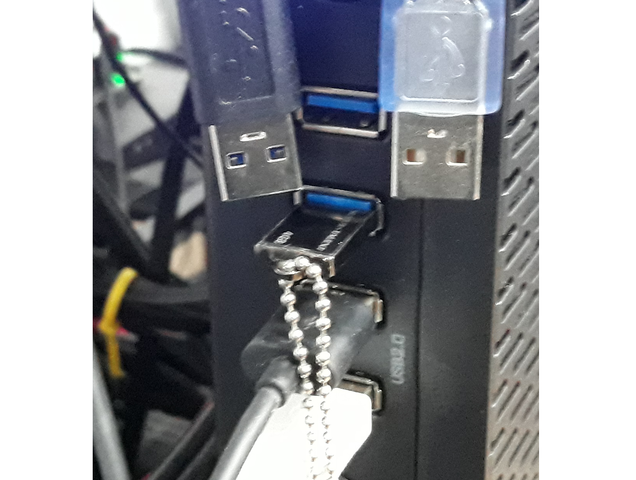
The joys of Plug & Play
... are not really apparent on our little virtual system. The issue stems from the fact that we need to state exactly what will be connected through USB before spinning the VM, and the way we do it at this point is by stating the vendor and product ids of the devices being connected, which may present another problem altogether if we have multiple items of the same exact type.
The multiple equal devices issue we can easily solve by stating the usb physical address in the form of bus and device id, as per the output of lsusb;
ce@bear:~/vms$ lsusb
Bus 008 Device 001: ID 1d6b:0003 Linux Foundation 3.0 root hub
Bus 007 Device 001: ID 1d6b:0002 Linux Foundation 2.0 root hub
Bus 006 Device 001: ID 1d6b:0003 Linux Foundation 3.0 root hub
Bus 005 Device 007: ID 1bcf:0005 Sunplus Innovation Technology Inc. Optical Mouse
Bus 005 Device 004: ID 04d9:1702 Holtek Semiconductor, Inc. Keyboard LKS02
Bus 005 Device 001: ID 1d6b:0002 Linux Foundation 2.0 root hub
Bus 004 Device 001: ID 1d6b:0003 Linux Foundation 3.0 root hub
Bus 003 Device 001: ID 1d6b:0002 Linux Foundation 2.0 root hub
Bus 002 Device 001: ID 1d6b:0003 Linux Foundation 3.0 root hub
Bus 001 Device 016: ID 04d9:a02a Holtek Semiconductor, Inc.
Bus 001 Device 015: ID 05e3:0608 Genesys Logic, Inc. Hub
Bus 001 Device 001: ID 1d6b:0002 Linux Foundation 2.0 root hub
ce@bear:~/vms$ lsusb -t
/:  Bus 08.Port 1: Dev 1, Class=root_hub, Driver=xhci_hcd/4p, 5000M
/:  Bus 07.Port 1: Dev 1, Class=root_hub, Driver=xhci_hcd/4p, 480M
/:  Bus 06.Port 1: Dev 1, Class=root_hub, Driver=xhci_hcd/4p, 5000M
/:  Bus 05.Port 1: Dev 1, Class=root_hub, Driver=xhci_hcd/4p, 480M
    |__ Port 1: Dev 4, If 0, Class=Human Interface Device, Driver=usbhid, 1.5M
    |__ Port 1: Dev 4, If 1, Class=Human Interface Device, Driver=usbhid, 1.5M
    |__ Port 3: Dev 7, If 0, Class=Human Interface Device, Driver=usbhid, 1.5M
/:  Bus 04.Port 1: Dev 1, Class=root_hub, Driver=xhci_hcd/2p, 10000M
/:  Bus 03.Port 1: Dev 1, Class=root_hub, Driver=xhci_hcd/2p, 480M
/:  Bus 02.Port 1: Dev 1, Class=root_hub, Driver=xhci_hcd/8p, 10000M
/:  Bus 01.Port 1: Dev 1, Class=root_hub, Driver=xhci_hcd/14p, 480M
    |__ Port 9: Dev 15, If 0, Class=Hub, Driver=hub/4p, 480M
        |__ Port 2: Dev 16, If 0, Class=Human Interface Device, Driver=usbhid, 1.5M
In our case, we need to add the two devices on bus 5, numbers 4 and 7 as number 1 is the hub itself. The thing about the device number is that it changes every time you reconnect the device, so what we really need is the output from the second command lsusb -t (as in tree) so we get the actual physical port number the device is attached to, in our case 1 and 3. We can tweak formatter.py and 001.json to allow for setting either bus + device id or product + vendor id, and that solves the duplicate item issue altogether.
tmp = []
    for e in actualconfig['usb']:
        tmpaddr = []
        for k,v in e.items():
            tmpaddr.append('{}={}'.format(k,v))
        tmp.append('\n-device usb-host,{} \\'.format(','.join(tmpaddr)))
    actualconfig['usb'] = ''.join(tmp)
"usb": [
{"vendorid":"0x1bcf", "productid":"0x0005"},
{"hostbus":5, "hostport":1}
],But what if I want to add something else? must I always check what the host bus and address are, or find the product and vendor ids? There must be an easier way. My first idea was to pass the usb hub itself to windows:
"usb": [
                {"hostbus":5, "hostaddr":1}
        ],
But that fails miserably, and it makes sense since the root hub is not really a USB device per se, so it cannot be enumerated and fed through to the VM:
libusb: error [op_reset_device] reset failed error -1 errno 21
libusb: error [release_interface] release interface failed, error -1 errno 22
qemu-system-x86_64: libusb_release_interface: -99 [OTHER]
libusb: error [release_interface] release interface failed, error -1 errno 22
libusb: error [op_reset_device] reset failed error -1 errno 21
libusb: error [udev_hotplug_event] ignoring udev action bind
libusb: error [udev_hotplug_event] ignoring udev action bind
But notice how the two devices, the mouse and keyboard, are on the same USB bus? It turns out that this particular motherboard, the MSI X399 Gaming Pro Carbon AC, has a pretty neat arrangement of USB ports physically, and while I'm sure other motherboards will have similar approaches as it makes sense for the electronic design, this next schematic applies only for this particular board, others will most likely vary quite a bit;
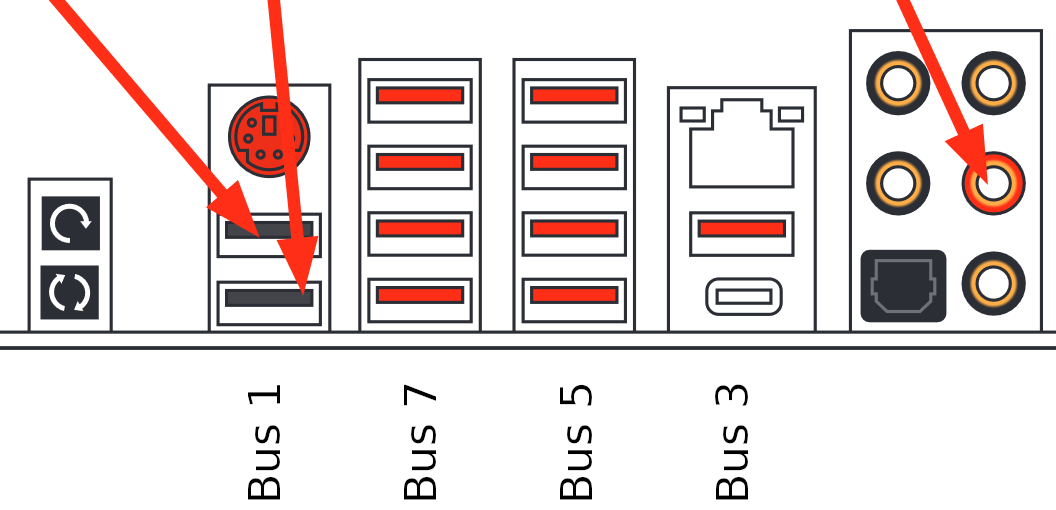
the USB bus numbers for the motherboard back connetions
Bus 5 and bus 7 are 4 port root hubs, so the two rows as depicted can be used exclusively for the VMs. Bus 1 is 14 ports large, and these include my case front panel, while bus 3 has the only USB-C connection available to me, so lets try and tweak formatter.py to grab all the available devices on a specific USB bus before booting up the VM.
ce@bear:~/vms$ lsusb -t
/:  Bus 08.Port 1: Dev 1, Class=root_hub, Driver=xhci_hcd/4p, 5000M
/:  Bus 07.Port 1: Dev 1, Class=root_hub, Driver=xhci_hcd/4p, 480M
/:  Bus 06.Port 1: Dev 1, Class=root_hub, Driver=xhci_hcd/4p, 5000M
/:  Bus 05.Port 1: Dev 1, Class=root_hub, Driver=xhci_hcd/4p, 480M
    |__ Port 1: Dev 11, If 0, Class=Human Interface Device, Driver=usbhid, 1.5M
    |__ Port 1: Dev 11, If 1, Class=Human Interface Device, Driver=usbhid, 1.5M
    |__ Port 3: Dev 3, If 0, Class=Human Interface Device, Driver=usbfs, 1.5M
/:  Bus 04.Port 1: Dev 1, Class=root_hub, Driver=xhci_hcd/2p, 10000M
/:  Bus 03.Port 1: Dev 1, Class=root_hub, Driver=xhci_hcd/2p, 480M
/:  Bus 02.Port 1: Dev 1, Class=root_hub, Driver=xhci_hcd/8p, 10000M
/:  Bus 01.Port 1: Dev 1, Class=root_hub, Driver=xhci_hcd/14p, 480M
    |__ Port 9: Dev 2, If 0, Class=Hub, Driver=hub/4p, 480M
        |__ Port 2: Dev 3, If 0, Class=Human Interface Device, Driver=usbhid, 1.5M
Looking at the output of lsusb -t we see the two base devices, the keyboard and mouse, on Bus 05, so I tried passing a single usb bus to the VM:
"usb": [
        {"hostbus":5}
]
And... it does work, sort of. A single device is passed to qemu, the first one found, which, again, makes perfect sense as the generated command line will include:
-usb \
-device usb-host,hostbus=5 \
So, what if I blindly add that 4 times to the config, even though not all ports are populated?
"usb": [
        {"hostbus":5},
        {"hostbus":5},
        {"hostbus":5},
        {"hostbus":5}
]
Well, it still kinda works. Now we get all 4 ports and not only do we get both the mouse and the keyboard, I can even move them into other ports (on the same bus) and they get detected and enumerated! However, when doing so a bunch of libusb errors get printed on the host console and the windows VM starts lagging and locking, sound becomes really jagged and weird, until eventually it settles once again into normal usagne. Not ideal...
Maybe if I specify the hostport(s)?
"usb": [
        {"hostbus":5, "hostport":1},
        {"hostbus":5, "hostport":2},
        {"hostbus":5, "hostport":3},
        {"hostbus":5, "hostport":4}
]
Yey! It works flawlessly this way. There are a few errors from libusb dumped to the console when I disconnect something, but it's quite a different set of errors (ignoring udev, file not found, that sort of thing) and a lot less of them. No lag or lock on windows either, so it looks like qemu supports passing the actual host USB port without filtering the device. Now, I could use lsusb -t to check how many ports a specific hub has, but maybe I can be lazy and just add a bunch? On my machine, the largest bus has 14 ports, so what if I always add 14 ports?
"usb": [
        {"hostbus":5, "hostport":1},
        {"hostbus":5, "hostport":2},
  <snip>
        {"hostbus":5, "hostport":13},
        {"hostbus":5, "hostport":14}
]
Once again, flawless! We have a solution. I'll check if a usb entry has hostbus defined but nothing else in the config, and just add 14 hostports on that bus if so:
tmp = []
  for e in actualconfig['usb']:
      tmpaddr = []
      if 'hostbus' in e and len(e) == 1:
          for i in range(14):
              tmp.append('\n-device usb-host,hostbus={},hostport={} \\'.format(e['hostbus'], i+1))
      else:
          for k,v in e.items():
              tmpaddr.append('{}={}'.format(k,v))
          tmp.append('\n-device usb-host,{} \\'.format(','.join(tmpaddr)))
  actualconfig['usb'] = ''.join(tmp)
Two questions remain; how fast are the USB ports on the VM compared to host speed and can I use hubs on the assigned ports?
How fast is too fast?
I am not currently equipped to test the USB throughput properly, so as a quick sanity check I'm connecting a little USB3.0 SanDisk Ultra Fit Flash drive I have lying around with a windows installation image. It's vfat formatted and I'll just grab the largest file on there to test the read speed.
ce@bear:~/mnt2/sources$ dd if=install.esd of=/dev/null status=progress
3879191040 bytes (3.9 GB, 3.6 GiB) copied, 42 s, 92.4 MB/s
7593097+1 records in
7593097+1 records out
3887665812 bytes (3.9 GB, 3.6 GiB) copied, 42.0889 s, 92.4 MB/s
Bearing in mind I have this USB 3.0 drive connected to a USB 3.1 port capable of 10Gb/s of raw throughput, the 92.4 MB/s, or 739.2Mb/s don't seem too impressive. Still, this does show that the drive is faster than the maximum USB2.0 theoretical throughput of 480Mb/s, which is what the USB host bus 5 on my machine is capable of. Lets try this again, but on the same port I'll be testing on the VM:
ce@bear:~/mnt2/sources$ dd if=install.esd of=/dev/null status=progress
3878142464 bytes (3.9 GB, 3.6 GiB) copied, 43 s, 90.2 MB/s
7593097+1 records in
7593097+1 records out
3887665812 bytes (3.9 GB, 3.6 GiB) copied, 43.1036 s, 90.2 MB/s
Now that's just weird. Shouldn't it be capped at ~60MB/s? Lets dig a bit further:
ce@bear:~/mnt2/sources$ lsusb -t
/:  Bus 08.Port 1: Dev 1, Class=root_hub, Driver=xhci_hcd/4p, 5000M
/:  Bus 07.Port 1: Dev 1, Class=root_hub, Driver=xhci_hcd/4p, 480M
/:  Bus 06.Port 1: Dev 1, Class=root_hub, Driver=xhci_hcd/4p, 5000M
    |__ Port 4: Dev 2, If 0, Class=Mass Storage, Driver=usb-storage, 5000M
/:  Bus 05.Port 1: Dev 1, Class=root_hub, Driver=xhci_hcd/4p, 480M
    |__ Port 1: Dev 11, If 0, Class=Human Interface Device, Driver=usbhid, 1.5M
    |__ Port 1: Dev 11, If 1, Class=Human Interface Device, Driver=usbhid, 1.5M
    |__ Port 2: Dev 17, If 0, Class=Human Interface Device, Driver=usbhid, 1.5M
/:  Bus 04.Port 1: Dev 1, Class=root_hub, Driver=xhci_hcd/2p, 10000Mn
/:  Bus 03.Port 1: Dev 1, Class=root_hub, Driver=xhci_hcd/2p, 480M
/:  Bus 02.Port 1: Dev 1, Class=root_hub, Driver=xhci_hcd/8p, 10000M
/:  Bus 01.Port 1: Dev 1, Class=root_hub, Driver=xhci_hcd/14p, 480M
    |__ Port 9: Dev 2, If 0, Class=Hub, Driver=hub/4p, 480M
        |__ Port 2: Dev 3, If 0, Class=Human Interface Device, Driver=usbhid, 1.5M
Oh, that's neat. So if you connect a different generation device you get connected to a different bus, even though it is the same physical port. Well, lets try to use both busses to the VM then.
"usb": [
        {"hostbus":5},
        {"hostbus":6}
]
With this, windows does see the extra ports and the SanDisk drive, but fails to use it. Looking at the Device Manager there's a yellow triangle warning me of issues on that specific device, and it looks like windows fails to initialize it. I looked around the interwebs and found some other similar instances of people having almost, but not quite the same problem but always with an older version of qemu, which used slightly different options to start with. So, not wanting to waste too much time around this little hiccup, and not wanting to get my arse off the chair to hunt down a different flash drive, just in case this problem is just one specific device (though it works just fine on bare metal windows) I decided to try a different approach; Why not add the actual USB host controller to the VM through vfio-pci, just like we did for the GPU?
Heiko's blog, as per usual, sheds some light on how to go about that, and at this point I'm inclined to try and script the driver switch from whatever to vfio-pci, on demand.
ce@bear:~/vms$ lspci | grep USB
01:00.0 USB controller: Advanced Micro Devices, Inc. [AMD] X399 Series Chipset USB 3.1 xHCI Controller (rev 02)
03:00.0 USB controller: ASMedia Technology Inc. Device 2142
42:00.3 USB controller: Advanced Micro Devices, Inc. [AMD] Family 17h (Models 00h-0fh) USB 3.0 Host Controller
43:00.3 USB controller: Advanced Micro Devices, Inc. [AMD] Family 17h (Models 00h-0fh) USB 3.0 Host Controller
ce@bear:~/vms$ lspci -kn
  <snip>
43:00.0 Non-Essential Instrumentation [1300]: Advanced Micro Devices, Inc. [AMD] Device 145a
        Subsystem: Advanced Micro Devices, Inc. [AMD] Device 145a
43:00.2 Encryption controller: Advanced Micro Devices, Inc. [AMD] Family 17h (Models 00h-0fh) Platform Security Processor
        Subsystem: Advanced Micro Devices, Inc. [AMD] Family 17h (Models 00h-0fh) Platform Security Processor
        Kernel driver in use: ccp
        Kernel modules: ccp
43:00.3 USB controller: Advanced Micro Devices, Inc. [AMD] Family 17h (Models 00h-0fh) USB 3.0 Host Controller
        Subsystem: Advanced Micro Devices, Inc. [AMD] Family 17h (Models 00h-0fh) USB 3.0 Host Controller
        Kernel driver in use: xhci_hcd
  <snip>
There are a few controllers, but I'm guessing they'll be showing up in order, so I'll use the last one, that should represent busses 7 and 8 on lsusb. With this in mind I'll check if it is already present in the vfio-pci driver devices list, which it won't as it is currently xhci_hcd, and then unbind from that and bind to vfio, all based on the pci address that we'll have in the config file.
ce@bear:~/vm$ ls /sys/bus/pci/drivers/vfio-pci/
0000:0a:00.0  0000:0a:00.1  bind  module  new_id  remove_id  uevent  unbind
ce@bear:~/vm$ sudo su -c'echo 0000:43:00.3 > /sys/bus/pci/devices/0000\:43\:00.3/driver/unbind'
ce@bear:~/vm$ sudo su -c'echo vfio-pci > /sys/bus/pci/devices/0000\:43\:00.3/driver_override'
ce@bear:~/vm$ sudo su -c'echo 0000:43:00.3 > /sys/bus/pci/drivers/vfio-pci/bind'
ce@bear:~/vm$ ls /sys/bus/pci/drivers/vfio-pci/
0000:0a:00.0  0000:0a:00.1  0000:43:00.3  bind  module  new_id  remove_id  uevent  unbind
Bear in mind, however, that this is only possible if the pci device (the usb host controller) you are targeting is alone in an IOMMU group, as this one is:
ce@bear:~/vms$ for a in /sys/kernel/iommu_groups/*; do find $a -type l; done | sort --version-sort
  <snip>
sys/kernel/iommu_groups/31/devices/0000:43:00.0
/sys/kernel/iommu_groups/32/devices/0000:43:00.2
/sys/kernel/iommu_groups/33/devices/0000:43:00.3
/sys/kernel/iommu_groups/34/devices/0000:44:00.0
/sys/kernel/iommu_groups/35/devices/0000:44:00.2
Before I code this vfio-pci driver binding helper into launcher.py, lets give it a go on the VM and see if that solves the flash drive issue.
"usb": [
        {"hostbus":5},
],
"vfio": [
        "0a:00.0,multifunction=on,romfile=/home/ce/ZotacGTX1080TImini.rom",
        "0a:00.1",
        "43:00.3"
]
And it works so well I had to disconnect the drive to boot, otherwise the BIOS would pick it up as the first boot device. Still, how about performance? Just copying the file from USB to the desktop sustained an almost constant speed of 144MB/s which, huh? That's 1.5x faster than on linux. I'll assume the bottleneck there was the filesystem driver, as it is vfat after all, but the larger conclusion is that yes, indeed, we can get pretty good speeds from devices on USB on the VM :)
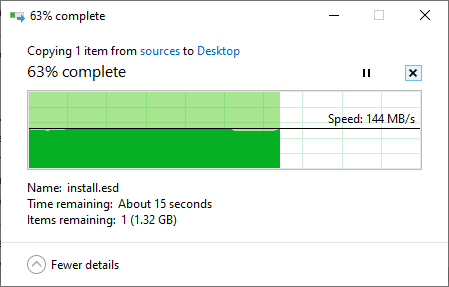
Transferring the file from USB to Desktop
I am using a separate bus for the keyboard and mouse though, let me move them over to the vfio driven hub and remove the hostbus nr 5 from the VM, see if everything still gets handled well.
"usb": [
],
"vfio": [
        "0a:00.0,multifunction=on,romfile=/home/ce/ZotacGTX1080TImini.rom",
        "0a:00.1",
        "43:00.3"
]
And yes, indeed it does still work perfectly fine, thank you for asking. I guess now is a good time to revisit launcher.py and do a few tweaks, but fist...
And if I need more ports?
Can I use a USB hub? I'm pretty confident that, with the vfio-pci approach, it should be perfectly fine, as windows is controlling the USB root controller itself, but I still want to give it a go with the hostbus approach too, you know, for science.
Unfortunately, all I can find is this old, cheap, 10 port USB 2.0 hub, but I guess that'll do. And as expected, when connected to one of the ports for the root host passed to the VM through vfio-pci, all is working as if was native, because it is native as far as windows is concerned.
Connecting to a qemu forwarded usb port is a different matter altogether and fails miserably. As we already have a better solution working I will not waste any more time trying to find out why it does not work exactly and if there is any workaround, but if I had to guess I would say that a hub connected to a port presents itself to libusb as a different hostbus, and thus devices connected to it will not be available as if connected to the originally forwarded port because, well, they aren't.
Some more tweaks
Along the way I made a few more updates to the scripts, like the mentioned vfio driver binding helper. In addition, since now the vfio driver can be attached after the fact, I removed the file /etc/modprobe.d/local.conf so we don't try and set anything to vfio on boot.
I also moved the console unbinding from the GPU to when a VM is spun up instead of right on boot, so I can still use the computer in the login console up until I spin the first VM, so if ever I do something that prevents me from logging in through the network I don't get locked out.
Lastly I wasn't checking if a vm process had terminated by itself before running actions on it, meaning that if I shutdown windows from the start menu I could not run it again using the shell or keypad, as it would complain VM 1 already started, even though the process had already quit. Trying to send quit 1 would crash the launcher, as it would try to communicate through a file descriptor that had been already closed. I now check for stale processes before running every command.
All the scripts used are, as before, to be found in the archive Windows_virtually_pt5-src.tar.bz2